Daniel Näslund writes:
"I use tags a lot. But I'm annoyed by all those open files it leaves
behind. It would be great if the file opened with g] or Ctrl-] would be
closed with Ctrl-T. If the file had been previously opened it would
remain open.
Another thing is a way to close all files except those currently viewed."
I don't use tags too often, so perhaps another reader can answer that question, but if you want to make all buffers except for the current buffer hidden, you can type in the :on ex-command. If you want to hide modified buffers as well, you can do :on!.
If the desired behavior is to actually delete the buffer, and you know it's buffer # or filename, you can do the following:
:bdelete file1 file2 file3
or something like
:1,3bdelete
Lastly, if you want to use a script to accomplish this, there's the BufOnly.vim which provides a single command to unload all buffers except the current one.
http://www.vim.org/scripts/script.php?script_id=1071
Showing posts with label question. Show all posts
Showing posts with label question. Show all posts
Wednesday, November 11, 2009


Monday, September 29, 2008
Question: Browsing Remote Filesystems
A Daily Vim reader asks the following question:
Travis, the feature that has me married to Kate (KDE text editor) is the file browser with bookmarks built in. Kate allows users to browse remote filesystems from within the app just like they could browse the local filesystem in a file manager. Furthermore, there is a bookmarks feature where users can bookmark specific directories / files on remote servers. Anythink like those two features in VIM?
Thanks!
Anybody have any ideas on this? I have a few ideas, but I'll wait and see if anybody else has a suggestions first.
Travis, the feature that has me married to Kate (KDE text editor) is the file browser with bookmarks built in. Kate allows users to browse remote filesystems from within the app just like they could browse the local filesystem in a file manager. Furthermore, there is a bookmarks feature where users can bookmark specific directories / files on remote servers. Anythink like those two features in VIM?
Thanks!
Anybody have any ideas on this? I have a few ideas, but I'll wait and see if anybody else has a suggestions first.
Friday, September 12, 2008
Question: Highlight From Insert?
Iyo writes:
"I offten do some coding in Vim and I miss an feature that will highlight
the word I`m writing in that moment and other same words. (It is mainly
for variables - sometimes I switched letters and afterwards I`m looking
for mistake for a quite long time. The NetBeans IDE has a feature like this.
I know about * but it`s for search in the text. I`m looking for something that work automaticly in insert mode."
Answer:
You can use ctrl-o from inside of insert mode to enter a command, but to me typing ctrl-o * while I'm hammering out some code feels awfully cumbersome. There's also the negative side-effect that * jumps forward, so you'd lose cursor position, which would assuredly interrupt workflow. Instead, I'd just define a simple mapping along the lines of the following.
imap <F2> <Esc>#*A
So, you're inside insert mode, you just typed a word, and you want to match all occurrences. You would simply hit F2, and it would backward match the word nearest the cursor. This has the negative side effect of jumping backwards; thereby, losing cursor position. To compensate, we add a * to jump forward followed by "A" to return to insert mode and insure you're at the end of the line. Obviously, you can substitute any keybinding you want for F2.
This seems to work well on my machine; although, there might be more optimal solutions. If anybody has one, feel free to share.
"I offten do some coding in Vim and I miss an feature that will highlight
the word I`m writing in that moment and other same words. (It is mainly
for variables - sometimes I switched letters and afterwards I`m looking
for mistake for a quite long time. The NetBeans IDE has a feature like this.
I know about * but it`s for search in the text. I`m looking for something that work automaticly in insert mode."
Answer:
You can use ctrl-o from inside of insert mode to enter a command, but to me typing ctrl-o * while I'm hammering out some code feels awfully cumbersome. There's also the negative side-effect that * jumps forward, so you'd lose cursor position, which would assuredly interrupt workflow. Instead, I'd just define a simple mapping along the lines of the following.
imap <F2> <Esc>#*A
So, you're inside insert mode, you just typed a word, and you want to match all occurrences. You would simply hit F2, and it would backward match the word nearest the cursor. This has the negative side effect of jumping backwards; thereby, losing cursor position. To compensate, we add a * to jump forward followed by "A" to return to insert mode and insure you're at the end of the line. Obviously, you can substitute any keybinding you want for F2.
This seems to work well on my machine; although, there might be more optimal solutions. If anybody has one, feel free to share.
Thursday, September 11, 2008
Got a Question?
I had a reader of Daily Vim contact me yesterday about the possibility of periodically submitting questions regarding Vim best practices, etc. I told him that I'm very happy to assist in answering questions any Daily Vim readers might have but if I don't know the answer, I'll post the question here anyway, so someone smarter than me can ;-).
So, if you have a question regarding Vim, Linux, scripting or something along those lines, feel free to post them under this thread or email me directly via tinymountain at gmail dot com. I'll post the question and possibly an answer to the blog, and as usual, feedback is welcome.
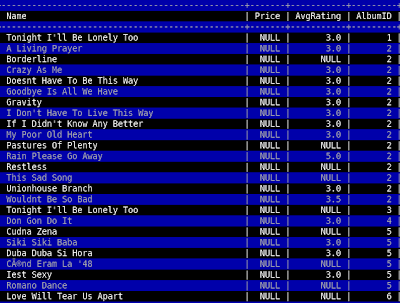
To kick things off, I have a question of my own. Does anybody know of a Vim plugin or some method to spontaneously highlight every other line of a file? I frequently use Vim as a pager inside of MySQL, and this would be very handy for eyeballing all the values on a specific row.
UPDATE:
I solved this problem thanks in part to an initial suggestion to use syntax highlighting to perform the highlighting. Here's my finished solution. It seems to have issues with language files with pre-existing syntax highlighting, but for it's intended purpose (use within the mysql pager), it works beautifully. Just do "pager /usr/bin/vim -R -" inside the mysql client, add the code to your vimrc, run a query and hit F2.
So, if you have a question regarding Vim, Linux, scripting or something along those lines, feel free to post them under this thread or email me directly via tinymountain at gmail dot com. I'll post the question and possibly an answer to the blog, and as usual, feedback is welcome.
To kick things off, I have a question of my own. Does anybody know of a Vim plugin or some method to spontaneously highlight every other line of a file? I frequently use Vim as a pager inside of MySQL, and this would be very handy for eyeballing all the values on a specific row.
UPDATE:
I solved this problem thanks in part to an initial suggestion to use syntax highlighting to perform the highlighting. Here's my finished solution. It seems to have issues with language files with pre-existing syntax highlighting, but for it's intended purpose (use within the mysql pager), it works beautifully. Just do "pager /usr/bin/vim -R -" inside the mysql client, add the code to your vimrc, run a query and hit F2.
hi AlternateLine ctermfg=grey ctermbg=darkblue

function! HiLine(lineno)
    let tmpline = escape(getline(a:lineno), '/\[]')
    exec 'syn match AlternateLine /.*' . tmpline . '.*/'
endfunction

function! DoHighlight()
  global /^/if line('.')%2|call HiLine(line('.'))
  normal 1G
endfunction

map <F2> :call DoHighlight()<cr>

Subscribe to:
Posts (Atom)

 Posts
Posts

