I'm currently doing some consulting work to bridge the gap between Oracle and MySQL. Being in a Windows environment, I'm using the Activestate Perl distribution. Fortunately, it includes a nice ODBC module for connecting to Oracle out of the box. The bad news is, it doesn't contain a MySQL module. Luckily, I found a third party host that does provide the module. The following ppm (Perl Package Manager) one-liner takes care of the issue.
C:\>ppm install http://cpan.uwinnipeg.ca/PPMPackages/10xx/DBD-mysql.ppd
Showing posts with label mysql. Show all posts
Showing posts with label mysql. Show all posts
Thursday, October 16, 2008


Thursday, September 11, 2008
Got a Question?
I had a reader of Daily Vim contact me yesterday about the possibility of periodically submitting questions regarding Vim best practices, etc. I told him that I'm very happy to assist in answering questions any Daily Vim readers might have but if I don't know the answer, I'll post the question here anyway, so someone smarter than me can ;-).
So, if you have a question regarding Vim, Linux, scripting or something along those lines, feel free to post them under this thread or email me directly via tinymountain at gmail dot com. I'll post the question and possibly an answer to the blog, and as usual, feedback is welcome.
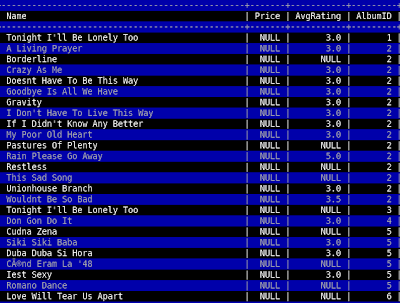
To kick things off, I have a question of my own. Does anybody know of a Vim plugin or some method to spontaneously highlight every other line of a file? I frequently use Vim as a pager inside of MySQL, and this would be very handy for eyeballing all the values on a specific row.
UPDATE:
I solved this problem thanks in part to an initial suggestion to use syntax highlighting to perform the highlighting. Here's my finished solution. It seems to have issues with language files with pre-existing syntax highlighting, but for it's intended purpose (use within the mysql pager), it works beautifully. Just do "pager /usr/bin/vim -R -" inside the mysql client, add the code to your vimrc, run a query and hit F2.
So, if you have a question regarding Vim, Linux, scripting or something along those lines, feel free to post them under this thread or email me directly via tinymountain at gmail dot com. I'll post the question and possibly an answer to the blog, and as usual, feedback is welcome.
To kick things off, I have a question of my own. Does anybody know of a Vim plugin or some method to spontaneously highlight every other line of a file? I frequently use Vim as a pager inside of MySQL, and this would be very handy for eyeballing all the values on a specific row.
UPDATE:
I solved this problem thanks in part to an initial suggestion to use syntax highlighting to perform the highlighting. Here's my finished solution. It seems to have issues with language files with pre-existing syntax highlighting, but for it's intended purpose (use within the mysql pager), it works beautifully. Just do "pager /usr/bin/vim -R -" inside the mysql client, add the code to your vimrc, run a query and hit F2.
hi AlternateLine ctermfg=grey ctermbg=darkblue

function! HiLine(lineno)
    let tmpline = escape(getline(a:lineno), '/\[]')
    exec 'syn match AlternateLine /.*' . tmpline . '.*/'
endfunction

function! DoHighlight()
  global /^/if line('.')%2|call HiLine(line('.'))
  normal 1G
endfunction

map <F2> :call DoHighlight()<cr>

Thursday, August 21, 2008
Installing Ruby DBI, MySQL on Centos 5.2
There's no good documentation on how to do this online, so here's a quick tutorial on how to get Ruby's DBI and MySQL packages installed on CentOS 5.2. There aren't any pre-packaged binaries for this, so building from scratch is pretty much your only option.
# download
wget http://tmtm.org/downloads/mysql/ruby/mysql-ruby-2.7.tar.gz
# extract
tar zxvf mysql-ruby-2.7.tar.gz
# change dir
cd mysql-ruby-2.7
# configure (requires mysql development package AND gcc)
ruby extconf.rb --with-mysql-config
checking for mysql_ssl_set()... yes
checking for mysql.h... yes
creating Makefile
# finish (as root)
make install
(ignore warnings)
Now DBI:
# download
wget http://rubyforge.org/frs/download.php/41303/dbi-0.2.2.tar.gz
# extract
tar zxvf dbi-0.2.2.tar.gz
# change dir
cd dbi-0.2.2
# setup
ruby setup.rb config --with=dbi,dbd_mysql
ruby setup.rb setup
# finish (as root)
ruby setup.rb install
# download
wget http://tmtm.org/downloads/mysql/ruby/mysql-ruby-2.7.tar.gz
# extract
tar zxvf mysql-ruby-2.7.tar.gz
# change dir
cd mysql-ruby-2.7
# configure (requires mysql development package AND gcc)
ruby extconf.rb --with-mysql-config
checking for mysql_ssl_set()... yes
checking for mysql.h... yes
creating Makefile
# finish (as root)
make install
(ignore warnings)
Now DBI:
# download
wget http://rubyforge.org/frs/download.php/41303/dbi-0.2.2.tar.gz
# extract
tar zxvf dbi-0.2.2.tar.gz
# change dir
cd dbi-0.2.2
# setup
ruby setup.rb config --with=dbi,dbd_mysql
ruby setup.rb setup
# finish (as root)
ruby setup.rb install
Wednesday, July 30, 2008
Quickly Populate a Table
There are a lot of times in MySQL when I want to populate a table with dummy data. I've used scripts to do this on many occasions; however, this stored procedure works just as well. I'm posting it here mainly for my own reference. Obviously the insert and while sentinel need to be modified for your particular uses.
delimiter //
create procedure populate_table()
    begin declare i int default 0;
    while i < 10000
    do
        insert into test values (i, 'test', 'test2');
        set i = i+1;
    end while;
end//
delimiter ;
Tuesday, July 29, 2008
MySQL High Availability, Sandbox + Proxy
I've been doing a lot of research and testing lately in regard to getting a high availability MySQL solution in place. Namely, I've been looking into moving from a master/slave topology to a multi-master replication ring. This article is not intended to be a comprehensive howto; rather, a cursory overview of some of the available technologies and how they fit together.
Multi-master replication is one area where MySQL leads the pack of open-source DB solutions. Until 5.x, there wasn't really a satisfying solution in regard to avoiding primary-key collissions across masters. Fortunately, this key obstacle has since been resolved with the addition of a few simple commands:
server 1:
replicate-same-server-id = 0
auto-increment-increment = 2
auto-increment-offset = 1
server 2:
server-id = 2
replicate-same-server-id = 0
auto-increment-increment = 2
auto-increment-offset = 2
By defining a unique increment and offest value per server, primary key collisions on inserts are avoided when the binlog is processed. Telling MySQL not to replicate the same server ID means that in a circular replication topology, once an event has made it's way around the ring, it stops at the server from which it originated.
Setting up a test environment with multiple MySQL servers used to be a pain. Luckily, a relatively new project on the scene allows one to easily setup an arbitrary number of MySQL install instances on a single machine. Enter MySQL sandbox. Setting up a replication ring consisting of two masters is a matter of downlading the tarball of the version you want to sandbox and running the following command:
The last piece of software I want to mention is MySQL proxy. Although still in pre-beta, proxy is one of the more impressive pieces of software I've seen lately. As most proxies are, it's a piece of middleware, in this case, delegating wire requests between a client and MySQL server. An embedded lua interpreter allows fine-grained control over all aspects of communication. Creative uses include things like re-writing query syntax and providing a SQL interface to the Unix shell; however, the real attractiveness of proxy in my opinion is that it provides two very valuable facilities not baked into MySQL by default. The first is load balancing, and the second is failover. Consider an invocation such as the following:
Obviously, I've only scratched the surface of each of these technologies. Really digging into their capabilities and learning their inherent limitations is left as an exercise to the reader. I leave you with the following links.
Dual-Master MySQL Replication Done Right
Advanced Replication Techniques
MySQL Sandbox
MySQL Proxy
Multi-master replication is one area where MySQL leads the pack of open-source DB solutions. Until 5.x, there wasn't really a satisfying solution in regard to avoiding primary-key collissions across masters. Fortunately, this key obstacle has since been resolved with the addition of a few simple commands:
server 1:
replicate-same-server-id = 0
auto-increment-increment = 2
auto-increment-offset = 1
server 2:
server-id = 2
replicate-same-server-id = 0
auto-increment-increment = 2
auto-increment-offset = 2
By defining a unique increment and offest value per server, primary key collisions on inserts are avoided when the binlog is processed. Telling MySQL not to replicate the same server ID means that in a circular replication topology, once an event has made it's way around the ring, it stops at the server from which it originated.
Setting up a test environment with multiple MySQL servers used to be a pain. Luckily, a relatively new project on the scene allows one to easily setup an arbitrary number of MySQL install instances on a single machine. Enter MySQL sandbox. Setting up a replication ring consisting of two masters is a matter of downlading the tarball of the version you want to sandbox and running the following command:
./make_replication_sandbox --master_master /path/to/mysql/tarball.gz
The last piece of software I want to mention is MySQL proxy. Although still in pre-beta, proxy is one of the more impressive pieces of software I've seen lately. As most proxies are, it's a piece of middleware, in this case, delegating wire requests between a client and MySQL server. An embedded lua interpreter allows fine-grained control over all aspects of communication. Creative uses include things like re-writing query syntax and providing a SQL interface to the Unix shell; however, the real attractiveness of proxy in my opinion is that it provides two very valuable facilities not baked into MySQL by default. The first is load balancing, and the second is failover. Consider an invocation such as the following:
#!/bin/sh
LUA_PATH="/usr/share/mysql-proxy/?.lua" /usr/sbin/mysql-proxy \
 --proxy-address=:3306 \
 --proxy-lua-script=/usr/share/mysql-proxy/rw-splitting.lua \
 --proxy-backend-addresses=127.0.0.1:19101 \
 --proxy-backend-addresses=127.0.0.1:19102 \
 --proxy-read-only-backend-addresses=127.0.0.1:19103
Obviously, I've only scratched the surface of each of these technologies. Really digging into their capabilities and learning their inherent limitations is left as an exercise to the reader. I leave you with the following links.
Dual-Master MySQL Replication Done Right
Advanced Replication Techniques
MySQL Sandbox
MySQL Proxy
Tuesday, June 24, 2008
MySQL Pager = Vim
When using MySQL, you can set any pager you wish using the pager command.
mysq> pager less
PAGER set to 'less'
Using Vim as your pager allows you to quickly munge query output into whatever format you want.
mysql> pager vim -
PAGER set to 'vim -'
Thanks to Jay for the tip!
mysq> pager less
PAGER set to 'less'
Using Vim as your pager allows you to quickly munge query output into whatever format you want.
mysql> pager vim -
PAGER set to 'vim -'
Thanks to Jay for the tip!
Thursday, June 19, 2008
Grep For a Column
Sometimes when using MySQL, you need to know every table that contains a given column name. In the past I've accomplished this with a short script, but I've come to find out that you can simply use a SQL statement instead.
SELECT table_name FROM information_schema.COLUMNS WHERE table_schema='my_db' AND column_name='MyColumn';
SELECT table_name FROM information_schema.COLUMNS WHERE table_schema='my_db' AND column_name='MyColumn';
Wednesday, June 11, 2008
A Few MySQL Tricks
Here are a few tricks I use quite a lot with MySQL.
1) copy an existing table's schema to a new table
This is handy for making a quick copy of an existing table to test indexes, populate data, etc...
CREATE TABLE NewTableName LIKE OldTableName;
2) copy an existing table to a new table
If you want more than just the structure, you can copy a table's raw data to a new table really easily. The downside is that keys and other constraints aren't preserved.
CREATE TABLE NewTableName SELECT * FROM OldTableName;
3) copy a table's exact structure and data
If you want to preserve everything (constraints, keys, etc...) and copy the data, it requires two steps.
CREATE TABLE NewTableName LIKE OldTableName;
INSERT INTO NewTableName SELECT * FROM OldTableName;
4) quickly load data while specifying columns
After reading the MySQL forums, I've realized a lot of people online think this is impossible. It's actually right there in the documentation; although, somewhat obscurely tucked away. MySQL DOES allow you to specify what columns to operate on when using LOAD DATA INFILE. Just use the following syntax.
LOAD DATA INFILE '/some/file/name.csv' INTO TABLE SomeTableName FIELDS TERMINATED BY ',' LINES TERMINATED BY '\n' (field1, field2, field3);
The field list goes at the end. Adjust the statement according to your needs, and enjoy the 20X increase in data load times.
5) atomic rename
There are a number of situations where you want to replace an entire table worth of data with a new table instantly. This is easily accomplished with an atomic rename and avoids a brief downtime while the tables are being switched.
RENAME TABLE TableName TO TableNamePrevious, TableNameNew TO TableName;
6) monitor a long running insert
If you've ever dealt with long-running inserts, you probably know how annoying it can be to just sit and wonder when the task will complete. For inserts performed in a single transaction, a simple select count(*) won't do because they're all or nothing. Take the following example:
INSERT INTO TableA SELECT * FROM TableB;
Fortunately, there's a way to peak behind the scenes. Do a count on the target table beforehand and make sure it has a populated primary key column. From there, you can do:
SHOW CREATE TABLE TableName;
Look at the last line of the table definition, and you'll see an AUTO_INCREMENT value. That's the last increment of the primary key. If you started with 25,000 rows, and AUTO_INCREMENT is 50,000 then you know 25,000 new rows have been inserted.
7) monitor a LOAD DATA INFILE
If you're using InnoDB, you can do SHOW INNODB and look at the transactions list. From there, "undo entries" displays the number of rows inserted via the current LOAD DATA INFILE operation thus far. This is convenient because I don't believe the AUTO_INCREMENT trick works for LOAD DATA INFILE.
1) copy an existing table's schema to a new table
This is handy for making a quick copy of an existing table to test indexes, populate data, etc...
CREATE TABLE NewTableName LIKE OldTableName;
2) copy an existing table to a new table
If you want more than just the structure, you can copy a table's raw data to a new table really easily. The downside is that keys and other constraints aren't preserved.
CREATE TABLE NewTableName SELECT * FROM OldTableName;
3) copy a table's exact structure and data
If you want to preserve everything (constraints, keys, etc...) and copy the data, it requires two steps.
CREATE TABLE NewTableName LIKE OldTableName;
INSERT INTO NewTableName SELECT * FROM OldTableName;
4) quickly load data while specifying columns
After reading the MySQL forums, I've realized a lot of people online think this is impossible. It's actually right there in the documentation; although, somewhat obscurely tucked away. MySQL DOES allow you to specify what columns to operate on when using LOAD DATA INFILE. Just use the following syntax.
LOAD DATA INFILE '/some/file/name.csv' INTO TABLE SomeTableName FIELDS TERMINATED BY ',' LINES TERMINATED BY '\n' (field1, field2, field3);
The field list goes at the end. Adjust the statement according to your needs, and enjoy the 20X increase in data load times.
5) atomic rename
There are a number of situations where you want to replace an entire table worth of data with a new table instantly. This is easily accomplished with an atomic rename and avoids a brief downtime while the tables are being switched.
RENAME TABLE TableName TO TableNamePrevious, TableNameNew TO TableName;
6) monitor a long running insert
If you've ever dealt with long-running inserts, you probably know how annoying it can be to just sit and wonder when the task will complete. For inserts performed in a single transaction, a simple select count(*) won't do because they're all or nothing. Take the following example:
INSERT INTO TableA SELECT * FROM TableB;
Fortunately, there's a way to peak behind the scenes. Do a count on the target table beforehand and make sure it has a populated primary key column. From there, you can do:
SHOW CREATE TABLE TableName;
Look at the last line of the table definition, and you'll see an AUTO_INCREMENT value. That's the last increment of the primary key. If you started with 25,000 rows, and AUTO_INCREMENT is 50,000 then you know 25,000 new rows have been inserted.
7) monitor a LOAD DATA INFILE
If you're using InnoDB, you can do SHOW INNODB and look at the transactions list. From there, "undo entries" displays the number of rows inserted via the current LOAD DATA INFILE operation thus far. This is convenient because I don't believe the AUTO_INCREMENT trick works for LOAD DATA INFILE.
Subscribe to:
Posts (Atom)

 Posts
Posts

