Iyo writes:
"I offten do some coding in Vim and I miss an feature that will highlight
the word I`m writing in that moment and other same words. (It is mainly
for variables - sometimes I switched letters and afterwards I`m looking
for mistake for a quite long time. The NetBeans IDE has a feature like this.
I know about * but it`s for search in the text. I`m looking for something that work automaticly in insert mode."
Answer:
You can use ctrl-o from inside of insert mode to enter a command, but to me typing ctrl-o * while I'm hammering out some code feels awfully cumbersome. There's also the negative side-effect that * jumps forward, so you'd lose cursor position, which would assuredly interrupt workflow. Instead, I'd just define a simple mapping along the lines of the following.
imap <F2> <Esc>#*A
So, you're inside insert mode, you just typed a word, and you want to match all occurrences. You would simply hit F2, and it would backward match the word nearest the cursor. This has the negative side effect of jumping backwards; thereby, losing cursor position. To compensate, we add a * to jump forward followed by "A" to return to insert mode and insure you're at the end of the line. Obviously, you can substitute any keybinding you want for F2.
This seems to work well on my machine; although, there might be more optimal solutions. If anybody has one, feel free to share.
Showing posts with label highlight. Show all posts
Showing posts with label highlight. Show all posts
Friday, September 12, 2008


Thursday, September 11, 2008
Got a Question?
I had a reader of Daily Vim contact me yesterday about the possibility of periodically submitting questions regarding Vim best practices, etc. I told him that I'm very happy to assist in answering questions any Daily Vim readers might have but if I don't know the answer, I'll post the question here anyway, so someone smarter than me can ;-).
So, if you have a question regarding Vim, Linux, scripting or something along those lines, feel free to post them under this thread or email me directly via tinymountain at gmail dot com. I'll post the question and possibly an answer to the blog, and as usual, feedback is welcome.
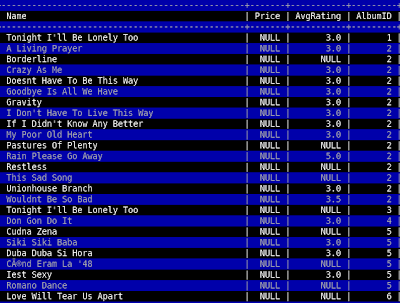
To kick things off, I have a question of my own. Does anybody know of a Vim plugin or some method to spontaneously highlight every other line of a file? I frequently use Vim as a pager inside of MySQL, and this would be very handy for eyeballing all the values on a specific row.
UPDATE:
I solved this problem thanks in part to an initial suggestion to use syntax highlighting to perform the highlighting. Here's my finished solution. It seems to have issues with language files with pre-existing syntax highlighting, but for it's intended purpose (use within the mysql pager), it works beautifully. Just do "pager /usr/bin/vim -R -" inside the mysql client, add the code to your vimrc, run a query and hit F2.
So, if you have a question regarding Vim, Linux, scripting or something along those lines, feel free to post them under this thread or email me directly via tinymountain at gmail dot com. I'll post the question and possibly an answer to the blog, and as usual, feedback is welcome.
To kick things off, I have a question of my own. Does anybody know of a Vim plugin or some method to spontaneously highlight every other line of a file? I frequently use Vim as a pager inside of MySQL, and this would be very handy for eyeballing all the values on a specific row.
UPDATE:
I solved this problem thanks in part to an initial suggestion to use syntax highlighting to perform the highlighting. Here's my finished solution. It seems to have issues with language files with pre-existing syntax highlighting, but for it's intended purpose (use within the mysql pager), it works beautifully. Just do "pager /usr/bin/vim -R -" inside the mysql client, add the code to your vimrc, run a query and hit F2.
hi AlternateLine ctermfg=grey ctermbg=darkblue

function! HiLine(lineno)
    let tmpline = escape(getline(a:lineno), '/\[]')
    exec 'syn match AlternateLine /.*' . tmpline . '.*/'
endfunction

function! DoHighlight()
  global /^/if line('.')%2|call HiLine(line('.'))
  normal 1G
endfunction

map <F2> :call DoHighlight()<cr>

Subscribe to:
Posts (Atom)

 Posts
Posts

